

Troubleshooting
Delete Measurements
Remove post-processing measurements from a study when no longer required.
Delete Measurements
This guide explains how to permanently remove a post-processing measurement from a study in HeartLab.
If you only need to remove a measurement from mean calculations while keeping the measurement visible in the study, use:
Exclude from Mean instead of deleting the measurement entirely.
Delete a Measurement
To delete a measurement:
- Open the target study.
- Locate the measurement within the left-hand measurement pane.
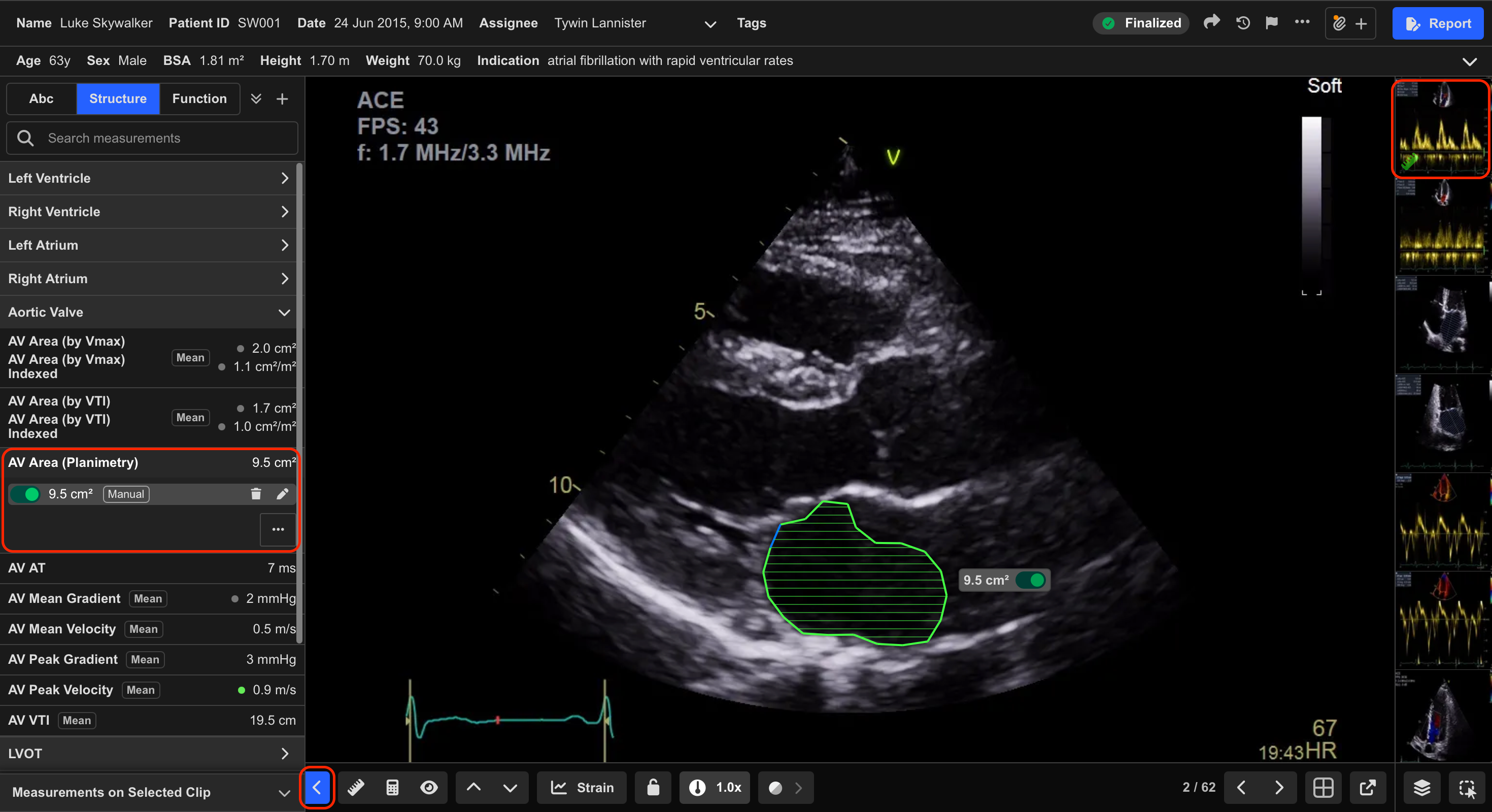
Alternatively, measurements can also be identified from the associated image or clip within the Study Viewer.
The clip list displays a green ruler icon on clips containing off-the-cart measurements.
- Confirm the exact measurement you wish to remove.
- Hover over the measurement row.
- Select the Delete (Bin) icon.
- Select OK to confirm deletion.
Result
Once deleted:
- The measurement is permanently removed from the study
- The measurement will no longer appear in the measurement panel
- The value will no longer be included in report calculations or averages
Additional Notes
Deleting a measurement is irreversible.
Always confirm the correct measurement before deletion, particularly in studies containing multiple similar measurements.
 MFR
MFR