Stress Test Uploads
Stress Test Uploads
The HeartLab Agent can automatically upload cardiac stress test data from a local directory into HeartLab.
Supported vendors include GE CardioSoft, Norav, Mortara, and others that conform to the Cardiology XML standard.
Supported File Types
Stress test upload requires pairs of XML and PDF files with the same filename (excluding the file extension).
Configure Stress Test Uploads
- Open the HeartLab Agent.
- Navigate to Stress Test Uploads
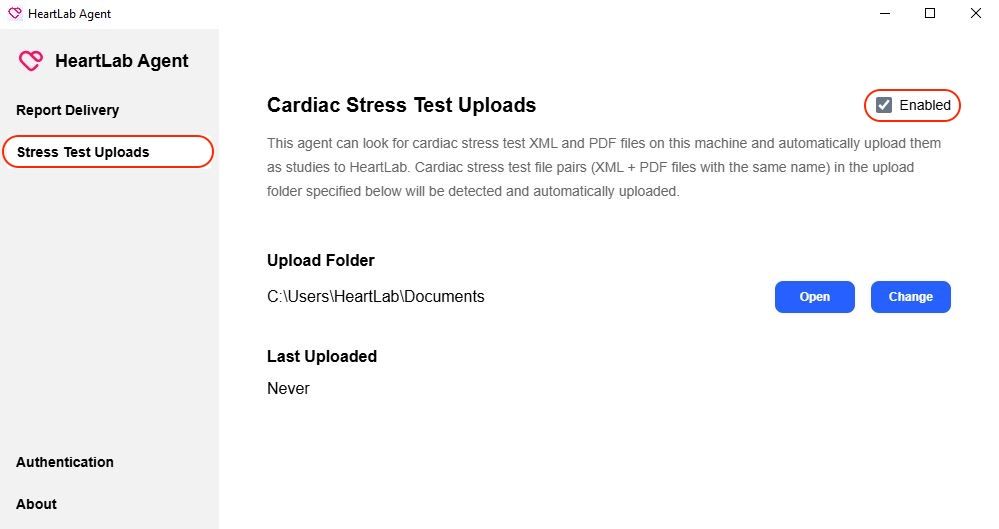
- Enable Stress Test Uploads
- Configure the Upload Folder
- Save the configuration.
- Place matching XML and PDF file pairs into the Upload Folder.
Example:
Documents\
  test1.xml
  test1.pdf
The HeartLab Agent scans the folder every five seconds and automatically uploads matching file pairs.
Successful Uploads
Successfully uploaded files are moved to:
Documents\
  processed\
    <timestamp>\
Failed Uploads
Failed uploads are moved to:
Documents\
  failed\
    <timestamp>\
An error.log file is included to assist troubleshooting. Failed uploads are also visible within HeartLab. Administrators can select Retry All Failed in HeartLab to retry failed uploads for a specific HeartLab Agent.
Troubleshooting
Common causes of failed uploads include:
- Missing XML file
- Missing PDF file
- XML and PDF filenames do not match
- Invalid file contents
- Network connectivity issues
If uploads fail:
- Confirm both files exist
- Confirm filenames match exactly
- Verify the Agent is connected to HeartLab
- Review the generated
error.log - Retry failed uploads from HeartLab
 MFR
MFR