

Technician Names
Technician Names
Studies uploaded from scanning machines can include metadata that automatically populates key study information within HeartLab.
One of these fields is the name of the technician or sonographer who performed the scan.
Technician names can be populated:
- Automatically from DICOM metadata sent by the scanning machine, or
- Manually through assignment dropdowns within HeartLab
Displaying technician names helps:
- Reduce manual data entry
- Improve workflow visibility
- Support accountability and auditability
- Simplify study assignment and review processes
Configure Technician Details from the Scanning Machine
The recommended workflow is to enter the technician’s name directly on the scanning machine before sending the study to HeartLab.
Depending on the imaging system, this may be configured within:
- User profile settings
- Operator fields
- Study-specific acquisition fields
When configured correctly, the technician name is automatically populated into the Operator Name column during study upload.
For guidance on configuring Study List columns, see:
Manual Technician Assignment
If technician information cannot be provided from the scanning machine, studies can instead be manually assigned through the Technician column.
Once the Technician column has been enabled:
- Locate the target study in the Study List.
- Select the Technician dropdown.
- Select a user with the appropriate role.
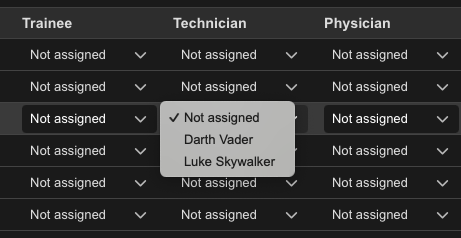
The assignment saves automatically.
 MFR
MFR